Enable the Show location of pointer when I press the CTRL key setting or you are doomed
ButterscotchNo3319 on
I wonder if he oversees all ?
K0nkyDonk on
Weakest NOC operator
navagon on
So these are the guys overseeing the Matrix? You’re doing a shit job, arseholes! It’s about to collapse.
CletusMuckenfuss on
Pull down and pick a corner.
SweettLiaaa on
This is why the ‘Show location of pointer when I press the CTRL key’ setting was invented. It’s a literal flare gun for your desktop.
LiquidPoint on
😄 yeah, I can understand the value of one extra monitor, if you need to read from something while you type somewhere else, but this?
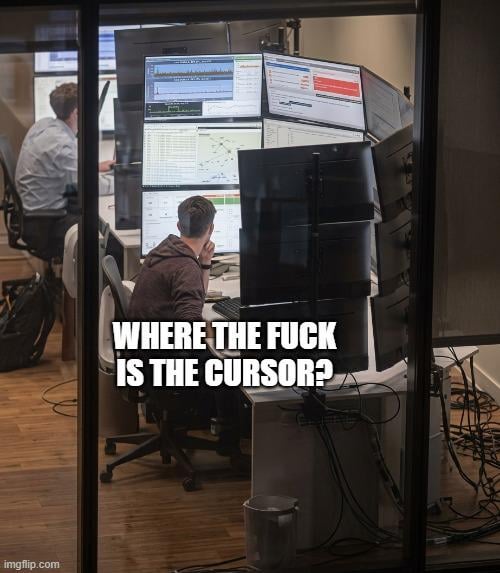
Well it looks like the ones visible are showing various kinds of network monitoring, so my guess is that it’s in fact not a single computer.. he probably has his workstation central, while the others are just monitors for supervision from another system.
Productivity doesn’t increase past 3 screens I’d say, and I’m very much used to using workspaces instead of extra screens.
Ooze3d on
Sometimes I get lost with just two screens. This would be a fucking nightmare
caelinyxelle on
Oh my God, I’m losing it on my monitor, and so many of them need a mouse for each monitor.
kings136 on
they should start using 5 mice at this point
Ryu_user on
now that I think about it…. wouldn’t that be a good way to like… train ur eyes to spot something really small and camouflaged thingy?
although it would be the most unnecessary shit to ever fucking do but it weirdly sounds fun to do when I think about it
kbytzer on
Stuck on the browser on monitor #6
Legal-Swordfish-1893 on
pretty sure there’s an accessibility setting for that in Windows, where you press… control? if I’m not mistaken and it shows you where your cursor is.
tanmayg26 on
Genuinely curious, what profession needs so many monitors?
According_Bee8064 on
In the 4th dimension
HungaryaRoli on
Is that fucking cisco packet tracer?
ryanCrypt on
What is the video out device (video card) that does this?
kattanakat on
I love this kind of meme. What would it be called?
NonViolentBadger on
Best thing I did after working with multiple screens and VMs, was change my mouse pointer to be large and bright green.
I also changed my VM’s to a different colour so I know what window I’m working in
SGTRoadkill1919 on
*spams left ctrl key while scanning every pixel of every monitor
scellycraftyt on
I have that powertoys thing that highlights the mouse when you double tap ctrl
IamSeekingAnswers on
That’s when you pull the KDE mouse wiggle move
Mr__H on
Ive got a setup like that at work. We used to have an older guy get really pissed because he would not find the cursor. Eventually we just made him a larger cursor. Then people actually liked it and everyone had a large cursor
Old_Crazy_8513 on
Dark mode.”
(referring to see a white cursor on light screens)
AdVegetable5896 on
CTRL…
Done…
Inside-Example-7010 on
LOL
I did one of those DEEP laughs when i read the caption.
I saw this pic yesterday without the caption so i feel like my subconsious was warmed up.
Prophet_Of_Loss on
The cursor is the in the chair, trying to find the $#@%! mouse pointer.
NYR_LFC on
Can anyone give a serious answer for what kind of work these guys would need this kind of set up for?
ForwardStorage777 on
I’d get a sunburn just sitting there.
jormangod on
Finally a person using control button to find the cursor
GreatThoughtsJR on
ctrl + ctrl
Juice___Springsteen on
Best prank on this guy is lowering his mouse pointer movement speed to the lowest setting. It’ll take him ages to figure out where it is and longer to adjust the settings back.
Negative_Gas8782 on
When you didn’t know alt+tab is a thing.
Visual_Attitude_9065 on
KDE:
Moe_MIEZ1 on
Just a little Streaming SetUp
OGgronch0 on
prolly just drag it at some top corner and go on from there
BussyPlaster on
Extra large high contrast cursor checking in. Skill issue
jack-K- on
Yank it down to the bottom left
KyeeLim on
shake mouse to enlarge cursor, my beloved feature that is built-in in KDE Plasma
DEMONDVS on
I lose my cursor with only 2 screens, the fuck! If I lose my cursor on that beast, I’m plugging a new one hoping spawns at the center screen
Robthebold on
I bet their eyes hurt at the end of the day.
StarryJackalopes on
*shakes mouse in Ubuntu*
LaritaDom on
best feature in KDE (Linux) is that if you shake the cursor, it keeps getting bigger the more you shake. It’s actually really useful with bigger screens, and really fun to do too
Yugenk on
Imagine ywhen they discover alt + tab.
Ginkiba on
I’m breaking out the SPF 50 and shades before sitting at that desk.
Signal-Experience315 on
That’s why mine cursor is lime, and I have only one monitor

48 Comments
Needs more monitors!
Enable the Show location of pointer when I press the CTRL key setting or you are doomed
I wonder if he oversees all ?
Weakest NOC operator
So these are the guys overseeing the Matrix? You’re doing a shit job, arseholes! It’s about to collapse.
Pull down and pick a corner.
This is why the ‘Show location of pointer when I press the CTRL key’ setting was invented. It’s a literal flare gun for your desktop.
😄 yeah, I can understand the value of one extra monitor, if you need to read from something while you type somewhere else, but this?
Well it looks like the ones visible are showing various kinds of network monitoring, so my guess is that it’s in fact not a single computer.. he probably has his workstation central, while the others are just monitors for supervision from another system.
Productivity doesn’t increase past 3 screens I’d say, and I’m very much used to using workspaces instead of extra screens.
Sometimes I get lost with just two screens. This would be a fucking nightmare
Oh my God, I’m losing it on my monitor, and so many of them need a mouse for each monitor.
they should start using 5 mice at this point
now that I think about it…. wouldn’t that be a good way to like… train ur eyes to spot something really small and camouflaged thingy?
although it would be the most unnecessary shit to ever fucking do but it weirdly sounds fun to do when I think about it
Stuck on the browser on monitor #6
pretty sure there’s an accessibility setting for that in Windows, where you press… control? if I’m not mistaken and it shows you where your cursor is.
Genuinely curious, what profession needs so many monitors?
In the 4th dimension
Is that fucking cisco packet tracer?
What is the video out device (video card) that does this?
I love this kind of meme. What would it be called?
Best thing I did after working with multiple screens and VMs, was change my mouse pointer to be large and bright green.
I also changed my VM’s to a different colour so I know what window I’m working in
*spams left ctrl key while scanning every pixel of every monitor
I have that powertoys thing that highlights the mouse when you double tap ctrl
That’s when you pull the KDE mouse wiggle move
Ive got a setup like that at work. We used to have an older guy get really pissed because he would not find the cursor. Eventually we just made him a larger cursor. Then people actually liked it and everyone had a large cursor
Dark mode.”
(referring to see a white cursor on light screens)
CTRL…
Done…
LOL
I did one of those DEEP laughs when i read the caption.
I saw this pic yesterday without the caption so i feel like my subconsious was warmed up.
The cursor is the in the chair, trying to find the $#@%! mouse pointer.
Can anyone give a serious answer for what kind of work these guys would need this kind of set up for?
I’d get a sunburn just sitting there.
Finally a person using control button to find the cursor
ctrl + ctrl
Best prank on this guy is lowering his mouse pointer movement speed to the lowest setting. It’ll take him ages to figure out where it is and longer to adjust the settings back.
When you didn’t know alt+tab is a thing.
KDE:
Just a little Streaming SetUp
prolly just drag it at some top corner and go on from there
Extra large high contrast cursor checking in. Skill issue
Yank it down to the bottom left
shake mouse to enlarge cursor, my beloved feature that is built-in in KDE Plasma
I lose my cursor with only 2 screens, the fuck! If I lose my cursor on that beast, I’m plugging a new one hoping spawns at the center screen
I bet their eyes hurt at the end of the day.
*shakes mouse in Ubuntu*
best feature in KDE (Linux) is that if you shake the cursor, it keeps getting bigger the more you shake. It’s actually really useful with bigger screens, and really fun to do too
Imagine ywhen they discover alt + tab.
I’m breaking out the SPF 50 and shades before sitting at that desk.
That’s why mine cursor is lime, and I have only one monitor
Bro’s gotta have neck like Mike Tyson