
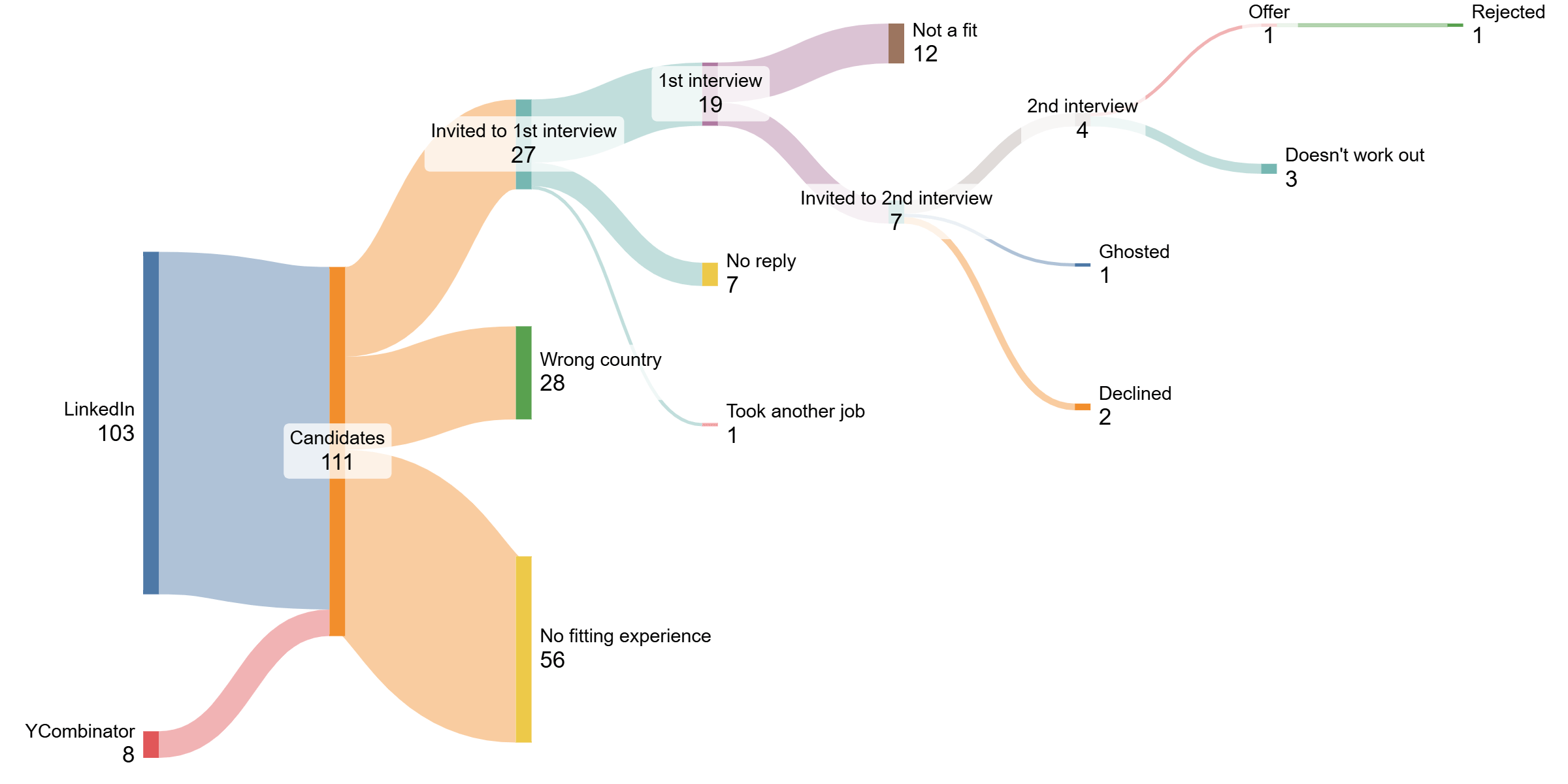
We are looking for a CEO / co-founder and reached out to people via the startup school of YCombinator and additionally posted a job on LinkedIn. While the quality on YCombinator is slightly higher since everybody is in the founder mindset already, the talent pool and speed on LinkedIn is higher.
Tips and tricks for your own applications in the comments.
Datasource: My own job posting
Tools: Sankeymatic, tracked status via Google sheets
by tlklk
1 Comment
This is the first time I am managing job applicants and here are my takeaways on applying for jobs on LinkedIn:
– Treat your LinkedIn profile like your CV.
– LinkedIn automatically analyzes your profile “with AI” and sorts you based on how well this parsed content fits a list of qualifications into “Top fit”, “Maybe”, and “Not a fit”.
– The first thing I see is your profile picture, name, headline, and location.
– Adjust your settings so everybody can see your profile picture. Leaves a weird impression if there is no picture to be seen.
– Use a professional picture.
– Fill your headline with keywords. I personally don’t like it, but it is really the only text some people will see. For everything else they would have to scroll. If there was a keyword that struck my eye, I scrolled and looked for verification.
– The screening questions are used to pre-filter candidates. It is possible to set thresholds and if they are not met (e. g. 3 years of experience), the candidate is moved to “Not a fit”. Nobody will look there. (I did though)
– If you are not eligible to work in the country the job is posted in why the f do you apply there? Save yourself and everybody else the time.
– The LinkedIn interface is horrible. It is built around automatically filtering people and when scrolling through applicants it loads in a way that it becomes really painful to work with. There is also no clear indication which applicants are new and often the first ones stay at the top. -> Takeaway: Be one of the first to apply. Don’t take time to polish, just apply. I had 10 applicants in the first hour (unsponsored). I looked at every single one of them in depth. The more applicants I had, the more I started scanning – I also knew better which skills to look for as they turned out to be rare amongst the candidates. I had 100 applications after 5 days when I took down the job posting. Be fast.
– In the LinkedIn interface only the logo, title, and company of your employers are shown (not the discriptions). Use the title to add keywords, especially for unknown companies. Did consulting? Add the type or for who. Software engineer? Add for what etc. Only when this looked interesting to me I went to your profile. Also, big company names are unfortunately more impressive / tangible.
– You can mark up to 3 jobs / month as “top choice” which allows you to leave a short message. 3 did that, I invited all of them to a first interview. One of them would have slipped through due to one key skill missing. He addressed that nicely in the message and we ended up making him the offer in the end.
– All people who had multiple “current jobs” (like 4 things that are still active today, e. g. Advisor, 2023–Present) turned out to be no quality candidates. But that’s more of a personal feeling.
– “Open for work” looks desperate. I heard that before, didn’t believe it, but now I do.
After I got the hang of it, I would scan a profile in the following order:
1. First impression (photo, location, headline)
2. Experience -> I would mostly scan it for what type of candidate it is: previous founder? industry? business / consultant / tech guy etc?
3. Only if still interested: Look at profile
4. Only if unsure: Look at screening questions. If I don’t find something we need in the profile, maybe it’s mitigated in the screening questions.
In the interviews itself, it is 90% vibes. At least for me.